Open a tab
The full workstation runs at soundlab-delta.vercel.app with nothing to install. Projects stay in this browser's storage.
Launch live webA workstation that synthesises the sound, prints it to a sample, and hands you the waveform to cut. The whole record can start and end in one window.
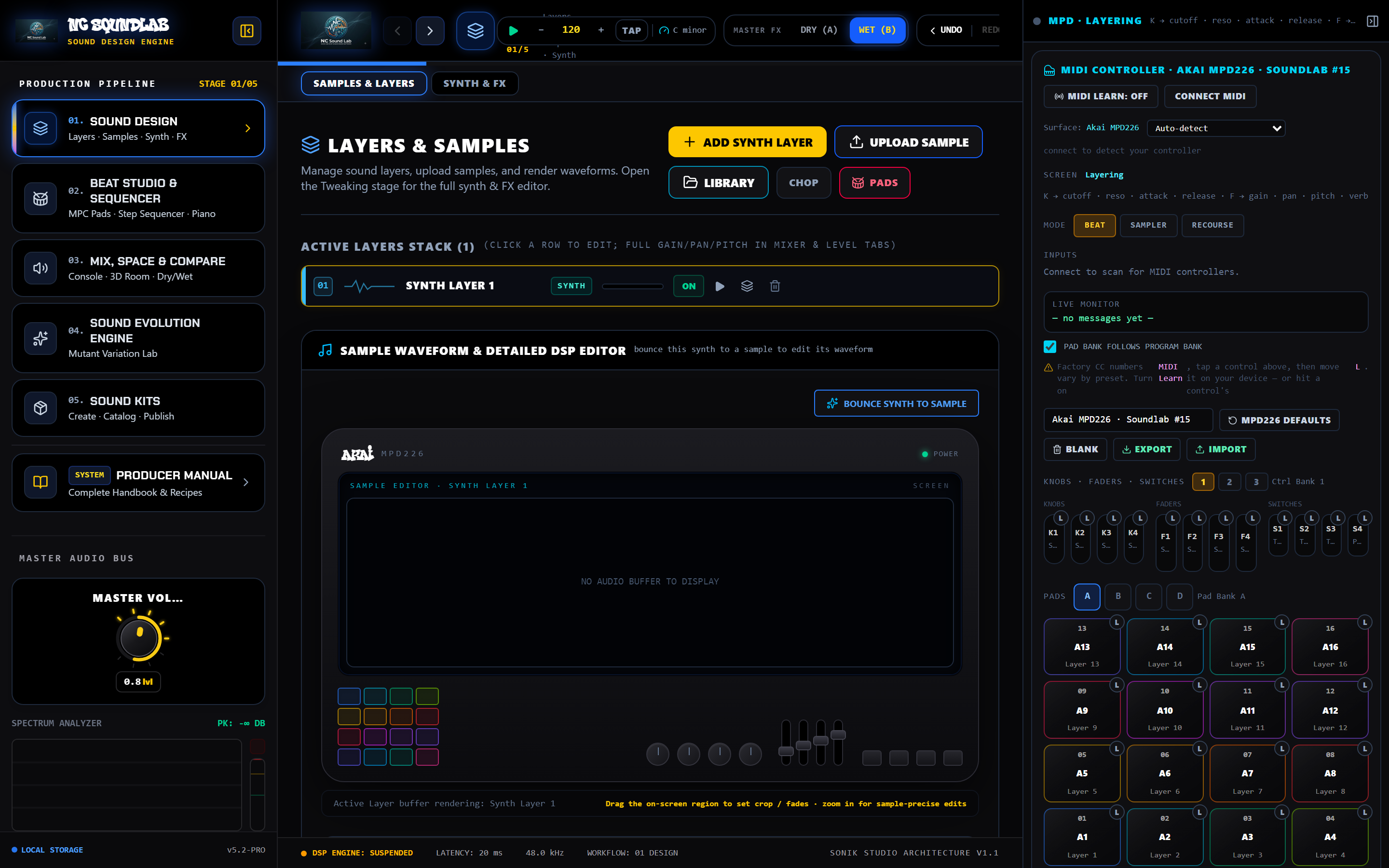
NCSoundlab is a five-stage production pipeline: design a sound, sequence it, mix it in three dimensions, evolve it into variants, then publish a kit. The browser build installs as a PWA and reloads offline; the Windows build wraps the same UI in Tauri. Both are free, and the source is Apache-2.0.
Free desktop app · Apache-2.0 · no checkout, now or after launch
Live web · Windows · PWA
Same engine, same project format, same free licence. Pick the surface that matches where the idea lands.
The full workstation runs at soundlab-delta.vercel.app with nothing to install. Projects stay in this browser's storage.
Launch live webThe Tauri build is the same UI in its own window, with projects written locally and an unsigned NSIS installer during beta.
Download the .exeInstall from the live web build for an app window and an offline shell. Your projects remain on the device.
Free and open source, permanently. The complete NCSoundlab source — React, Vite, the Web Audio DSP and the test suite — is public under Apache-2.0. The Windows build wraps the same UI in Tauri. There is no paid tier and no licence to buy, before or after December 1.
Most beat software starts with a sample and gives you a filter. NCSoundlab starts earlier: you build the oscillator stack, shape it, bounce it to a sample, then treat that sample as raw material. That is why a kit can be tuned to any root without pitching artefacts — the sound is generated at the target pitch, not stretched into it.
The interface is organised as five numbered stages: sound design, beat studio, mix/space/compare, sound evolution and sound kits. You can move freely between them; the stage list is a map, not a wizard.
A layer is a synth voice, an uploaded sample, or both. Each layer has its own gain, pan, pitch, high-pass and crop. The synth engine exposes wavefolding, hard sync, a zero-delay ladder filter and a granular stage; presets are starting points, not black boxes. When the layer sounds right, Bounce synth to sample renders it into the sample editor, where you can trim at zero crossings, fade, reverse, normalise or inject a controlled glitch.
Layers stack. A kick can be a pitched sine under a click under a room sample, each on its own fader. The stack is saved in the project, so a kit can be reopened and rebalanced later.
The step sequencer schedules notes on the Web Audio clock rather than JavaScript timers, so swing, groove and per-step offsets stay sample-accurate under load. Each step carries velocity, ratchet, probability and nudges. Pattern length is independent of the arrangement, and a pattern can be committed to the timeline as a clip.
The rack is the same engine the Android apps compile: trim, a ZDF ladder filter, Neve-style and SSL-style EQ, Pultec low end, FET and optical compression, VCA bus glue, tape/console saturation, plate reverb, a true-peak limiter and the phone-mic chain. Modules are ordered by drag, and every parameter is exposed to the Combinator, which can map a macro or an XY path onto any module.
Loudness is measured to ITU-R BS.1770. The compare view holds a reference track and reports integrated LUFS, short-term LUFS and true peak, so a mix is matched rather than guessed.
NCSoundlab's mixing assistant is a 4B Qwen3.5 adapter trained on 1,937 mixing, mastering and sound-design rows. It does not listen to audio; it turns a described problem into a starting chain or a single JSON recipe with actual Hz, dB, ms and LUFS values. The adapter, prompt format, test loss and limitations are public, so you can run it yourself or check what it was trained on.
NCSound Audio Mix 4B · PEFT adapter
One 170 MB adapter on top of Qwen3.5-4B. Rank 32, 3 epochs, validation loss 0.2292. Apache-2.0 weights; the base model keeps its own licence.
Samples can be uploaded, recorded, chopped by onset, or rendered from a synth layer. Kits collect the layers, patterns and rack state. Export gives you 24-bit WAVs, individual stems, or an AAF package for Pro Tools. Projects live in the browser's storage until you export; the desktop build writes them to disk.
All five stages are usable, but the Windows installer is unsigned and the web build is the reference. Very large projects can outrun browser storage, so export a project archive before clearing site data. AAF export is tested against Pro Tools, not every DAW. The manual documents the known gaps instead of hiding them.